
Скачать Aiseesoft iPad Video Converter for Mac
Put any video/audio to iPad on Mac.
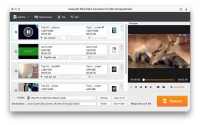
Aiseesoft iPad Video Converter for Mac is a quite easy and fast way for iPad users to put their movies and music on iPad. With it, users can convert all popular video(3PG, 3G2, AVI, DIF, FLV, DV, SWF, F4V, MOD, MJPG, MJPEG, TP, MKV, MPG, VOB, MPEG, MPEG-2, DAT, MP4, M4V, QT, MPV, MOV, RM, RMVB, TOD, TRP, WMV, ASF, TS, HD video) and audio(MP3, MP2, AAC, AC3, WAV, WMA, M4A, RM, RAM, OGG, AIF, AIFF, AU, APE, FLAC, NUT) files to iPad compatible video and audio formats on Mac. What's more, it is highly compatible with iPad mini 3/2, iPad Air 2, iPhone 6s/6s Plus, Microsoft Surface, Samsung Galaxy Note now after updated.
Key Functions
1. Convert any video/audio to iPad
It can help you convert all popular video and audio files to iPad H.264/MPEG-4 AVC, H.264, M4V MPEG-4, MOV, MPEG-4, WMV, H.264 HD Video and AAC, AIFF, M4A, MP3, WAV, WMA audio.
2. All Apple devices supported
Users can convert any video/audio to iPad mini 3/2, iPad Air 2, iPad Pro, iPhone 6s/6s Plus, iPhone 6, iPod touch and iPod nano compatible formats.
3. Add Video Watermark
Personalize your video with the image or text watermarks, and adjust its position, transparence, etc.
4. Crop Frame Size
Cut off unwanted playing areas of a video to fit your different portable players.
5. Trim video or audio
Trim a video or audio to your desired time length segments by setting the start and end time.
6. Merge files together
Merge several video or audio files into one file.
7. Set output video/audio effect
This software enables you to define the output video or audio parameters, such as Video Encoder, Frame Rate, Video Bitrate, Resolution, and Audio Encoder, Sample Rate, Channels, Audio Bitrate. Also you can adjust the video effect: brightness, contrast, saturation, hue and volume.
8. Choose Audio track and subtitle
This software will list all audio tracks and subtitles of your sources video, then you can choose one for the output file.
Скачать Aiseesoft iPad Video Converter for Mac бесплатно на странице загрузки.
Aiseesoft iPad Video Converter for Mac 8.1.6
Основная информация о программе
Разработчик
Лицензия
Версия
Дата релиза
Размер файла
Операционная система
Семейство
Версия ОС
Mac Other
Other
Требования
Популярность у пользователей
Рейтинг
Голосов
Статистика просмотров
За сегодня
За неделю
За все время
Статистика загрузок
За сегодня
За неделю
За все время
Дополнительная информация
Дата изменения
Ключевые слова
Скачать Aiseesoft iPad Video Converter for Mac 8.1.6
iPad Video Converter for Mac
mac ipad video converter
iPad Converter Mac
convert video to ipad on mac
ipad
Популярные программы рубрики


