
Скачать AT Video Decompiler
For capturing snapshots from your video file
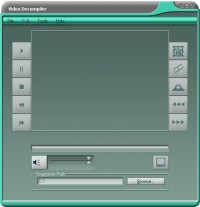
Video Decompiler is one of the greatest tools ever used for capturing snapshots from your video files.We support three tools for capturing snapshots: 1. Single snapshot: Captures a single snapshot from the video. 2. Continuous snapshots: Allows you to capture a portion of the video as a sequence of images. 3. Timed snapshots: Allows you to capture snapshots every certain amount of milliseconds.The main window is composed of three main parts which are Media Actions, Media Tools and the Main Menu Bar.There is also a frame at the bottom of the window which lets you change where you save your snapshots quickly without entering the Options window.In the part of Media Actions you will see a collection of buttons which includes the main media commands which are: rewind, play, pause, stop and fast forward.Also in the right side, you will find a button for mute/sound and a slider for setting the desired volume level. There’s a bar also which shows the progress of the movie.In the part of Media Tools you will find the functionality we provided for you to capture snapshots: By clicking the first button, you will capture a single snapshot. You can use the shortcut key Ctrl + F1.By clicking the second button, you will start to capture a sequence of images until you click it again. You can use the shortcut key Ctrl + F2.By clicking the third button, you might be asked to enter a number in terms of milliseconds (depends on how you set your options), you may check the checkbox shown in this dialog to use the number you specified as the default without showing the dialog again. Video Decompiler will then capture a snapshot automatically and will use that number as the interval of time to be waited after each snapshot.You can use the shortcut key Ctrl + F3.There’re two buttons that you can use for speeding up and down the video.The Main Menu Bar consists of the File Menu: In this menu you can either open an existing video or exit, Edit Menu,Tools and help.
Скачать AT Video Decompiler бесплатно на странице загрузки.
AT Video Decompiler 7.3.3.3000
Основная информация о программе
Разработчик
Рубрика
Лицензия
Версия
Дата релиза
Размер файла
Операционная система
Семейство
Версия ОС
Win98
WinME
WinNT 3.x
WinNT 4.x
Windows2000
WinXP
Windows Vista Starter
Windows Vista Home Basic
Windows Vista Home Premium
Windows Vista Business
Windows Vista Enterprise
Windows Vista Ultimate
Windows Vista Home Basic x64
Windows Vista Home Premiu
Требования
Популярность у пользователей
Рейтинг
Голосов
Статистика просмотров
За сегодня
За неделю
За все время
Статистика загрузок
За сегодня
За неделю
За все время
Дополнительная информация
Дата изменения
Ключевые слова
Скачать AT Video Decompiler 7.3.3.3000
Video
Decompiler
tools
capturing
snapshots
files
single
sequence
milliseconds
Single snapshot
Continuous snapshots
Timed snapshots
rewind
play
pause
stop
fast forward
movie
Популярные программы рубрики


