
Скачать Backup Software
Backup Software based on the XCOPY command.
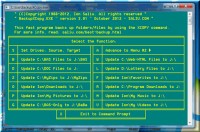
Backup Software based on the XCOPY command of Windows command prompt; software, source code, PDF, text tutorials included. I created a special program to back up everything that's important on a power-user's PC. I created also a batch file to do the same. This is the best and easiest procedure of backing up files or entire folders: XCOPY. The command has a plethora of options (via switches on the command line). Main switch: /D.
The /D option (switch) is the keystone of easy backup via the XCOPY command. If the files do not exist, they are copied to the Destination. If the files are modified on the Source, they will replace the older files on the Destination. If no files were modified on the Source, XCOPY fires this benign message: 0 files copied.
If a folder did not exist on the Destination (the drive that hosts the backup), then one is created; all the files on Source are copied to the Destination. If the folder exists on the Destination, then only the modified files will be copied (replaced or updated). To avoid the Invalid number of parameters error of XCOPY, the software surrounds directory names by quotation marks, in case the directory name contains blank spaces.
The advantage of BackupXCopy.BAT is scheduling. You can schedule the automatic running of my backup batch file. You do that via the Task Scheduler in Windows. Choose a day and time when you don't really need to use your PC, while BackupXCopy.BAT backs up your files in the background.
It works best at the command prompt for best speed; all 32/64 bit versions of Windows supported. http://saliu.com/membership.html http://saliu.com/gambling-lottery-lotto/command-prompt.htm . Absolutely the best on backup, software, Windows, source code, batch file, XCOPY, command prompt, BASIC programming language, free, directories, files, operating system.
Скачать Backup Software бесплатно на странице загрузки.
Backup Software 3.01
Основная информация о программе
Разработчик
Лицензия
Версия
Дата релиза
Размер файла
Операционная система
Семейство
Версия ОС
WinVista
WinVista x64
Win7 x32
Win7 x64
Win2000
Windows2000
Windows2003
WinServer
Windows Vista Ultimate
Windows Vista Ultimate x64
Win98
WinME
WinNT 3.x
WinNT 4.x
Win95
Windows Vista Starter
Windows Vista Home Basic
Windows Vista Home Premium
Windo
Требования
Популярность у пользователей
Рейтинг
Голосов
Статистика просмотров
За сегодня
За неделю
За все время
Статистика загрузок
За сегодня
За неделю
За все время
Дополнительная информация
Дата изменения
Ключевые слова
Скачать Backup Software 3.01
backup
software
Windows
source code
batch file
XCOPY
command prompt
BASIC programming language
free
directories
files
operating system
Популярные программы рубрики


