
Скачать Convert Adobe Pdf into Images
Pdf to photo converter extract picture of pdf
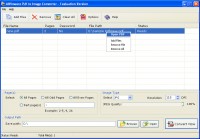
AWinware Pdf to Image Converter software converts bulk pdf files into photos in a single batch. This advance pdf to images creator software supports conversion of Adobe pdf into almost all popular photo files including JPG, GIF, PNG, BMP, EMF, WMF, EPS, TIFF etc. Program is easy to use and compatible with all latest Windows operating system including Win 7. Software can create single image for all pages of pdf as multipage (frames) TIFF bitmaps as well as can create individual pictures for each pages of any pdf file. There is an option to select specific page, part page or all pages for conversion into graphics. Tool has various inbuilt option to edit output photos like image rotation, flipping, resolution, compression, grayscale, monochrome, RGB color etc. Output photo file can be rotated at any angle and image size can also be adjusted. Conversion into TIFF uses CCIT, FAX, LZW, JPEG, PACKBITS and ZIP compression methods to reduce image size. In case of batch pdf conversion all the images saves in separate folder for each input pdf file.
Features:
1. Program support password protected pdf files for conversion.
2. Tool has compatibility with almost all Windows OS.
3. Multiple formats are available to set for output file.
4. TIFF files can be compressed using CCIT, FAX, LZW, JPEG, PACKBITS and ZIP methods.
5. Inbuilt image editing option is available.
Скачать Convert Adobe Pdf into Images бесплатно на странице загрузки.
Convert Adobe Pdf into Images 1.0.1.2
Основная информация о программе
Разработчик
Рубрика
Лицензия
Версия
Дата релиза
Размер файла
Операционная система
Семейство
Версия ОС
WinXP
Windows2003
Windows Vista Starter
Windows Vista Home Basic
Windows Vista Home Premium
Windows Vista Business
Windows Vista Enterprise
Windows Vista Ultimate
Windows Vista Home Basic x64
Windows Vista Home Premium x64
Windows Vista Busine
Требования
Популярность у пользователей
Рейтинг
Голосов
Статистика просмотров
За сегодня
За неделю
За все время
Статистика загрузок
За сегодня
За неделю
За все время
Дополнительная информация
Дата изменения
Ключевые слова
Скачать Convert Adobe Pdf into Images 1.0.1.2
Convert
image
files
pictures
photos
secure
password
single
multiple
bmp
jpg
gif
png
emf
wmf
eps
batch
conversion
bulk
converter
TIFF
Популярные программы рубрики


