
Скачать eDoc Zonal OCR
Extract OCR Contents
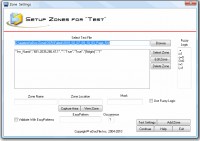
eDoc Zonal OCR is a program designed to capture data from scanned files, place the data in a csv file and rename the file based upon the contents of the file. It has the ability to validate the captured data with EasyPatterns (similar to Regular Expressions) to assure accuracy. The user can also use Fuzzy Logic when applying the EasyPattern to increase the percent of properly processed files.
For instance, many times an OCR engine will return an "I" instead of a "1" or a "O" instead of a "0". With Fuzzy Logic it can be assumed that if a number is being captured from the area of the file and an "O" is returned it is really a "0".
Once processed the user can import the data in the csv file into their database if desired (An import is not included with this program) or just search for the renamed file. The user can also view and update the file with eDocfile's Doc Viewer as well to create a simple workflow.
eDoc Zonal OCR works on the concept of each type of processing is a Job. So, there is a job for each type of document and as many jobs as desired can be created and the program will cycle though them.
Although it can be run on a server, it must first be setup on a workstation.
Скачать eDoc Zonal OCR бесплатно на странице загрузки.
eDoc Zonal OCR 3.0
Основная информация о программе
Разработчик
Рубрика
Лицензия
Версия
Дата релиза
Размер файла
Операционная система
Семейство
Версия ОС
Win2000
Windows Vista Ultimate
Windows Vista Starter
Windows Vista Home Basic
Windows Vista Home Premium
Windows Vista Business
Windows Vista Enterprise
Требования
Популярность у пользователей
Рейтинг
Голосов
Статистика просмотров
За сегодня
За неделю
За все время
Статистика загрузок
За сегодня
За неделю
За все время
Дополнительная информация
Дата изменения
Ключевые слова
Скачать eDoc Zonal OCR 3.0
OCR
Zonal
Zonal OCR
Популярные программы рубрики


