
Скачать Joyce Image Converter
Most user-friendly image and raw converter
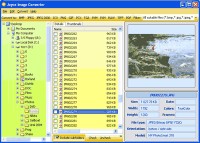
Searching a program to convert images? I'd recommend you try this. Joyce Image Converter has three fat advantages.
The first one is that supports all popular image formats: BMP, DIB, RLE, JPEG, JFIF, JPG, JPE, JPEG 2000, J2K, JP2, JPC, J2C, PNG, PSD, PDD, PCD, TIFF, TIF, FAX, G3N, G3F, ICO, GIF, WMF, EMF, WMZ, EMZ, PCX, DCX, CUT, PXM, PPM, PBM, PGM, TGA, TARGA, VDA, ICB, VST, WIN, CRW, CR2, NEF, PEF, RAF, X3F, RAW, BAY, ORF, MRW, SRF, MRW to BMP, JPEG, JPEG 2000, ICO, PNG, GIF, PCX, TGA, PXM, TIFF
The second advantage lies in its multi-optional functionality. Buying Joyce Image Converter you get not only a conversion tool but a resizer, a rotator and what not. Yes, with Joyce Image Converter you . It works with any icon size (16x16, 24x24, 32x32, 48x48, 64x64, 72x72, 96x96, 128x128) and can read and write 16 colors, 256 colors, TrueColor and 32bpp (XP-Style) icons.
The third one is its usability. Of course, every manufacturer says that his tool is easy-to-use. Though Joyce Image Converter is, I'm not speaking about it. There are three ways of using it. First, you may run the program, select the file and press Convert to (target format). The second way doesn't require launching Joyce Image Converter. You just select a file in Windows Explorer, click the right button of your mouse and press Convert to. Joyce Image Converter will do the rest for you. And you can convert your images within other programs using Joyce Image Converter's command line. Just decide which way suites you most.
Don't forget about batch converting if you have to convert a large number of files. Select your files manually or automatically by some mask, press Convert to. One hundred of files will be converted as fast as one file.
Frankly this is the best solution available at the market now. Enjoyce your converting!
Скачать Joyce Image Converter бесплатно на странице загрузки.
Joyce Image Converter 2.1
Основная информация о программе
Разработчик
Рубрика
Лицензия
Версия
Дата релиза
Размер файла
Операционная система
Семейство
Версия ОС
WinVista
WinVista x64
Win7 x32
Win7 x64
Win2000
Windows2000
Windows2003
WinServer
Windows Vista Ultimate
Windows Vista Ultimate x64
Win98
WinME
WinNT 4.x
Windows Vista Starter
Windows Vista Home Basic
Windows Vista Home Premium
Windows Vista Busines
Требования
Популярность у пользователей
Рейтинг
Голосов
Статистика просмотров
За сегодня
За неделю
За все время
Статистика загрузок
За сегодня
За неделю
За все время
Дополнительная информация
Дата изменения
Ключевые слова
Скачать Joyce Image Converter 2.1
image
convert
converting
JPG
GIF
BMP
PBM
PGM
PCX
PNG
PPM
TGA
TIF
WMF
EMF
utility
software
Популярные программы рубрики


