
Скачать Mac Brightness Control
Adjust brightness level of any Mac on Windows
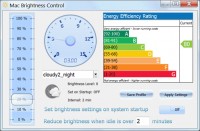
Is your Mac too bright or too dim after you install Microsoft Windows? Are brightness keys on your Mac not working? Doesn't your Mac auto adjust brightness any more? Can your Mac brightness change on its own with ambient light sensor? If you experience Mac brightness problem on Windows, try Mac Brightness Control software, which allows to adjust the brightness level of your Mac (MacBook Pro, MacBook Air, iMac, Mac Pro) on Windows Vista, Windows 7, Windows 8, and later operating systems.
If the brightness keys on your Mac keyboard are not working properly after you install and restart Microsoft Windows, you can drag the brightness slider in the Mac Brightness Control software to change your screen brightness.
The software enables your Mac running Microsoft Windows to auto adjust brightness without the aid of your Mac's ambient light sensor (ALS), reduce its screen brightness after a certain period of time saving power, and calibrate its monitor brightness when Windows starts up.
Advanced features include the association of weather, lumination, and brightness as a profile, which is a set of configurations to keep screen brightness level, whether to set brightness on your system startup, whether to reduce brightness when your Windows system runs into an idle state, and how long you can tolerate the idle. Profile can be one or many, and this depends on your practical needs. A profile can be either saved for future use or applied to take effect immediately. You can create profiles for sunny daylight, rainy night, cloudy dusk et al, and you can even create a profile for each user. For example, sunny daylight for John Smith, rainy night for My Daughter.
Mac Brightness Control can be minimized to the bottom-right corner of your screen as a tray icon application. Included its popup menu are several useful features such as to reduce your Mac brightness to the minimum immediately or raise your Mac brightness to the maximum for special purpose like presentation.
Скачать Mac Brightness Control бесплатно на странице загрузки.
Mac Brightness Control 1.0
Основная информация о программе
Разработчик
Рубрика
Лицензия
Версия
Дата релиза
Размер файла
Операционная система
Семейство
Версия ОС
Win7 x64
WinServer
WinVista
WinVista x64
WinXP
Требования
Популярность у пользователей
Рейтинг
Голосов
Статистика просмотров
За сегодня
За неделю
За все время
Статистика загрузок
За сегодня
За неделю
За все время
Дополнительная информация
Дата изменения
Ключевые слова
Скачать Mac Brightness Control 1.0
brightness
control
software
mac
adjust
change
dimmer
bright
screen
monitor
problem
auto
reduce
imac
slider
windows
macbook
air
pro
Популярные программы рубрики


