
Скачать OE No Messages can be Found Error Fix
No Messages can be Found in this Folder Fix
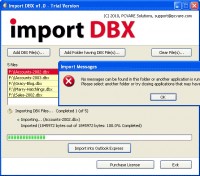
No messages can be found in this folder or another application is running that has the required files open. Please select another folder or try closing applications that may have files open - This is a common error message you encounter when you use Outlook Express Import Option. If you ever faced such Outlook Express import problem and you need to import dbx file into Outlook Express then PCVARE Import DBX is the instant solution for you. Import DBX is a perfect tool which aids OE users in the process of importing .dbx files into Outlook Express. PCVARE is offering Trial version of the Import DBX software for FREE to test the dbx import process. Trial version only allows importing of dbx files having file size smaller then 2 MB. Licensed version of Import DBX tool imports dbx files without any limitation.
Скачать OE No Messages can be Found Error Fix бесплатно на странице загрузки.
OE No Messages can be Found Error Fix 1.0
Основная информация о программе
Разработчик
Рубрика
Лицензия
Версия
Дата релиза
Размер файла
Операционная система
Семейство
Версия ОС
Win7 x32
Win7 x64
Win98
WinOther
WinVista
WinVista x64
WinXP
Other
Требования
Популярность у пользователей
Рейтинг
Голосов
Статистика просмотров
За сегодня
За неделю
За все время
Статистика загрузок
За сегодня
За неделю
За все время
Дополнительная информация
Дата изменения
Ключевые слова
Скачать OE No Messages can be Found Error Fix 1.0
no messages can be found in this folder
no messages can be found
outlook express no messages can be found in this folder
unable to import e-mail messages into outlook express 6
Популярные программы рубрики


