
Скачать Repair Damage Open Office File
How to Repair Damage Open Office File
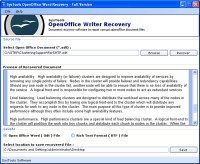
One solution here to repair damage Open Office file! It is none other than SysTools Open Office Writer Recovery. It is a small to read damage ODT database and save them with ease. SysTools Open Office Writer Recovery recovers and repair damage Open Office File with all elements like text, images, image objects, hyperlinks, Unicode characters, tables, text formatting, page headers and footers, page orientations etc. Repair ODT Document Solution reads corrupt ODT file, find out the reasons of corruption and work on them. As it recovers the corrupt ODT file, show the preview of recovered data and save them in RTF & ODT format. It is easy to read damage ODT Database using third party tool. The whole process completes within a few seconds and your all data contained in an ODT file is successfully recovered. Sometimes you observe that ODT file shows error message while you open your file like:
• The file "****.odt" is corrupt and therefore can not be reopened. Should OpenOffice.org repair the file?
• General Input/Output Error
• The file "file.odt" could not be repaired therefore cannot be opened
Software easily removes all the above errors and gets beck your data easily. Download demo version of SysTools Open Office Writer Recovery Tools to evaluate the software and check the preview of recovered content before saving. After checking the demo version, get the licensed version to save the recovered data in RTF & ODT format. Save option disables from demo version. For saving the data, you have to purchase licensed version at $29.
Скачать Repair Damage Open Office File бесплатно на странице загрузки.
Repair Damage Open Office File 2.0
Основная информация о программе
Разработчик
Лицензия
Версия
Дата релиза
Размер файла
Операционная система
Семейство
Версия ОС
Win7 x32
Win7 x64
Win98
WinOther
WinServer
WinVista
WinVista x64
WinXP
Other
Требования
Популярность у пользователей
Рейтинг
Голосов
Статистика просмотров
За сегодня
За неделю
За все время
Статистика загрузок
За сегодня
За неделю
За все время
Дополнительная информация
Дата изменения
Ключевые слова
Скачать Repair Damage Open Office File 2.0
repair damage open office file
repair odt document solution
read damage odt database
save odt file after corruption
Популярные программы рубрики


