
Скачать View Damage Open Office
View Damage Open Office File in RTF Format
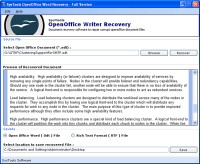
It is difficult to view damage Open Office file without taking a recovery tool because the damage file restricts you to open file normally and display the error message. SysTools Open Office Writer is the one software that can make the difficult become easy. Just install and browse the file. After browsing the file, it will show you the contacts easily or you can read corrupt Open Office Document. Software removes the following error messages if it appears at the time of opening a file
• The file "****.odt" is corrupt and therefore can not be reopened. Should OpenOffice.org repair the file?
• General Input/Output Error
• The file "file.odt" could not be repaired therefore cannot be opened
First of all software find out the exact problem of corruption and use the optimized option to resolve it. Software recovers ODT file data like texts, hyperlinks, tables, headers, footers, images etc and gives you two options for saving the recovered content – RTF & ODT file format. Choose one of them and use this file in future. Using ODT or RTF format, you can use this file through any version of MS Word. Any doubt still remains, try demo version of SysTools Open Office Writer Recovery Tool. It is an evaluation version of the original software that will help you to preview of recovered content. If you satisfied the result, you can go for using licensed version of SysTools Open Office Writer Recovery. It is economical; result oriented and feature specific tool avail with $29.
Скачать View Damage Open Office бесплатно на странице загрузки.
View Damage Open Office 2.0
Основная информация о программе
Разработчик
Лицензия
Версия
Дата релиза
Размер файла
Операционная система
Семейство
Версия ОС
WinNT 3.x
WinNT 4.x
Windows2000
WinXP
Windows2003
Windows Vista Starter
Windows Vista Home Basic
Windows Vista Home Premium
Windows Vista Business & Windows7
Требования
Популярность у пользователей
Рейтинг
Голосов
Статистика просмотров
За сегодня
За неделю
За все время
Статистика загрузок
За сегодня
За неделю
За все время
Дополнительная информация
Дата изменения
Ключевые слова
Скачать View Damage Open Office 2.0
view damage open office file
view damage open office data
recover odt file after damage
read corrupt open office document
Популярные программы рубрики


